
Introduction
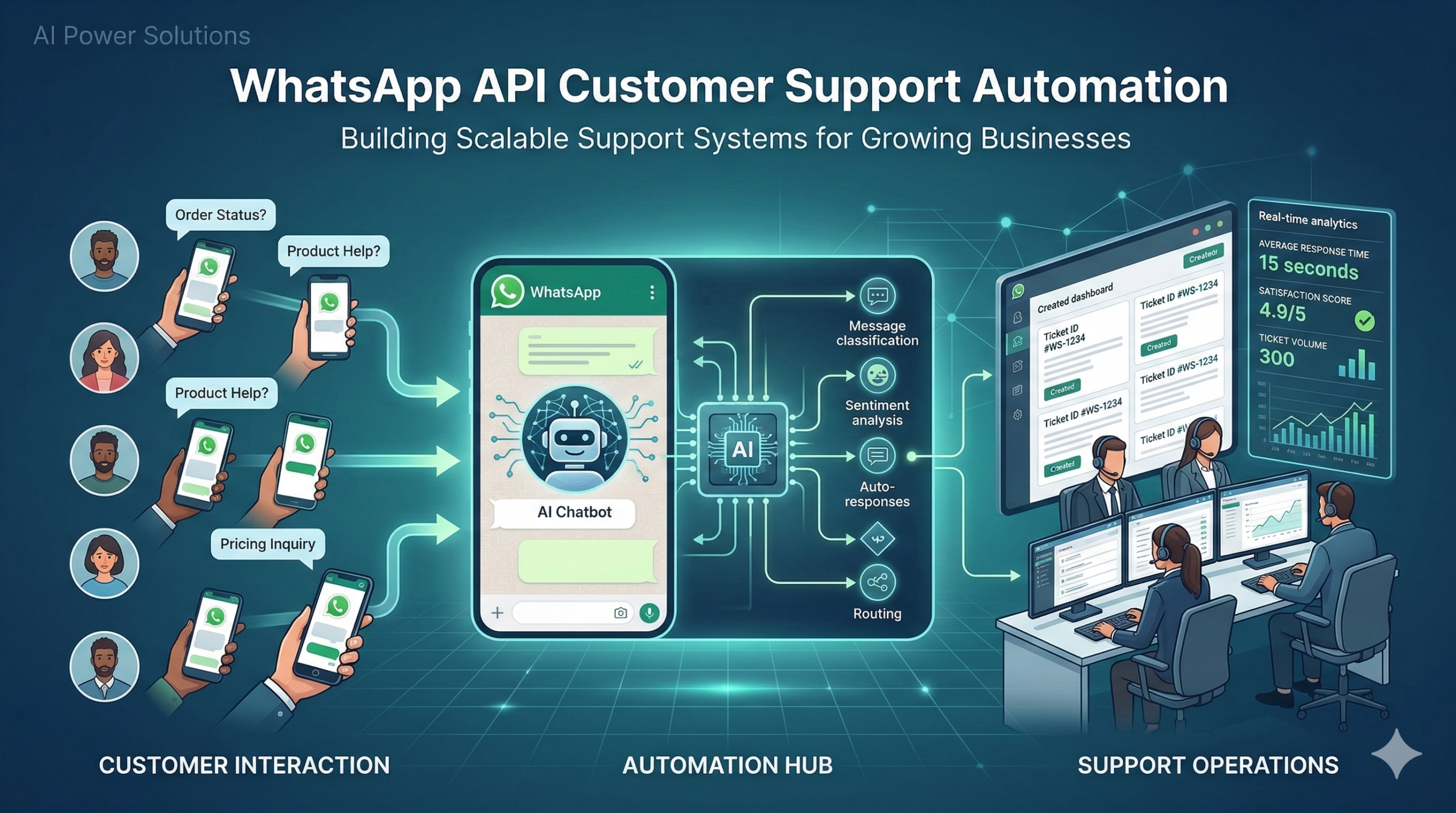
WhatsApp API automation for customer support is changing the way businesses handle support at scale. Instead of managing chats manually across multiple devices, companies are moving toward structured, API-driven systems that can be tracked, integrated, and expanded.
For support leaders, this is not just about adding a new messaging channel. It is about redesigning the entire support infrastructure around faster responses, conversational experiences, and automation that helps teams work more efficiently.
With the WhatsApp Business API, organizations can build workflows that connect messaging directly to helpdesk tools, CRM platforms, and backend systems. This allows teams to manage customer conversations in a centralized environment instead of relying on individual devices.
1. Support Expectations Have Changed
Customer expectations around support have evolved significantly. People now expect assistance that is:
- Fast or near-instant
- Mobile-friendly
- Clear and conversational
Email tickets and phone calls still play an important role, but messaging platforms have become increasingly important for day-to-day support interactions.
Many customers now prefer to ask questions, report issues, and track updates through messaging apps such as WhatsApp.
WhatsApp API customer support automation transforms these interactions into structured workflows that can scale across teams and regions.
Instead of agents responding manually from personal devices, businesses can operate through centralized systems that manage conversations, track metrics, and automate routine responses.
2. Why WhatsApp Is Becoming a Major Support Channel
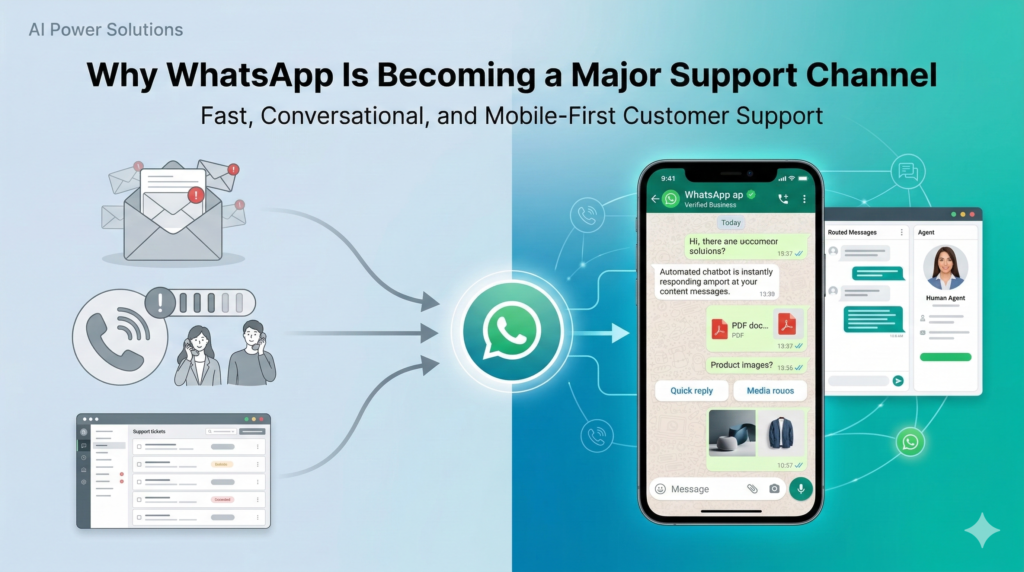
Several global trends explain why WhatsApp is becoming a key customer support channel.
Global Messaging Adoption
Messaging apps are now one of the most common communication tools worldwide. Billions of users rely on WhatsApp daily for both personal and business interactions.
Because the platform is already familiar, customers naturally use it to contact businesses.
Preference for Chat-Based Support
Chat support offers several advantages:
- Customers can send a message and return later
- Rich media such as images or documents can clarify problems
- No waiting on phone queues or navigating complex IVR systems
For quick questions or updates, chat feels faster and more convenient than email or phone support.
Mobile-First Communication
In many markets, smartphones are the primary device customers use to access services.
Customers want to:
- Ask questions on their phones
- Receive notifications and updates
- Continue conversations across multiple days if needed
WhatsApp naturally fits this mobile-first behavior.
Expectation of Fast Responses
Messaging platforms have conditioned users to expect quick replies. Businesses that respond rapidly through WhatsApp often see higher satisfaction and stronger customer loyalty.
3. What the WhatsApp Official API Enables for Support Teams
The WhatsApp Official Business API turns WhatsApp into a scalable support infrastructure.
Instead of a single phone handling conversations, support teams can operate through centralized systems.
Key capabilities include:
Multi-Agent Support
Multiple agents can handle conversations simultaneously from a shared environment such as a helpdesk or CRM system.
This enables:
- Shift coverage
- Regional support teams
- Dedicated queues for specific issues
Intelligent Message Routing
Messages can be automatically routed based on:
- Topic or intent
- Language
- Customer segment
- Geographic location
Routing ensures the right team handles each conversation.
Automated Workflows
Automation can:
- Send welcome messages
- Collect initial information
- Provide self-service options
- Trigger backend processes
This reduces repetitive work for support agents.
Integration With Support Platforms
The WhatsApp API can connect with tools such as:
- Zendesk
- Freshdesk
- Zoho Desk
- Intercom
This integration turns WhatsApp conversations into trackable support tickets.
Conversation Analytics
API-based messaging enables detailed reporting such as:
- First response time
- Resolution time
- Message volume
- Category analysis
This level of insight is not possible when support is managed on individual devices.
4. How WhatsApp API Support Automation Works
The technical flow behind WhatsApp API customer support automation typically follows several steps.
Message Received
A customer sends a message through WhatsApp using a business number.
Webhook Event Triggered
The WhatsApp API sends a webhook event to the backend system containing message data.
Intent Detection
Automation systems analyze the message using:
- Keywords
- Structured menus
- AI-based intent recognition
This helps identify the customer’s issue.
Routing Logic
Based on intent and customer information, the system decides:
- Which automation flow to activate
- Whether to route the conversation to an agent
- Whether escalation is required
Automated Response or Agent Handoff
The system may:
- Answer the question automatically
- Collect additional details
- Transfer the conversation to a support agent
Backend System Updates
Support systems update automatically:
- Tickets created or updated
- CRM records modified
- Analytics events logged
This creates a fully integrated support workflow.
5. Core WhatsApp API Customer Support Workflows
Several automation workflows are widely used in WhatsApp support systems.
FAQ Automation
Common questions can be answered instantly using automated flows.
Examples include:
- Delivery times
- Password reset instructions
- Refund policies
Automation provides consistent answers while reducing agent workload.
Automated Order Tracking
When customers ask about orders, automation can:
- Request an order ID
- Query backend systems
- Send status updates automatically
This eliminates manual tracking checks.
Ticket Creation From Conversations
Support tickets can be created automatically when customers report issues.
The ticket includes:
- Conversation history
- Customer information
- Issue details
Updates can be sent back to the customer through WhatsApp.
Intelligent Routing
Automation can categorize messages and route them to the correct team such as:
- Billing
- Technical support
- Sales assistance
This reduces delays and improves resolution times.
Follow-Up Notifications
Automated notifications keep customers informed.
Examples include:
- Ticket confirmations
- Status updates
- Resolution messages
These updates build trust and reduce repeated inquiries.
6. Integrating WhatsApp With Support Platforms
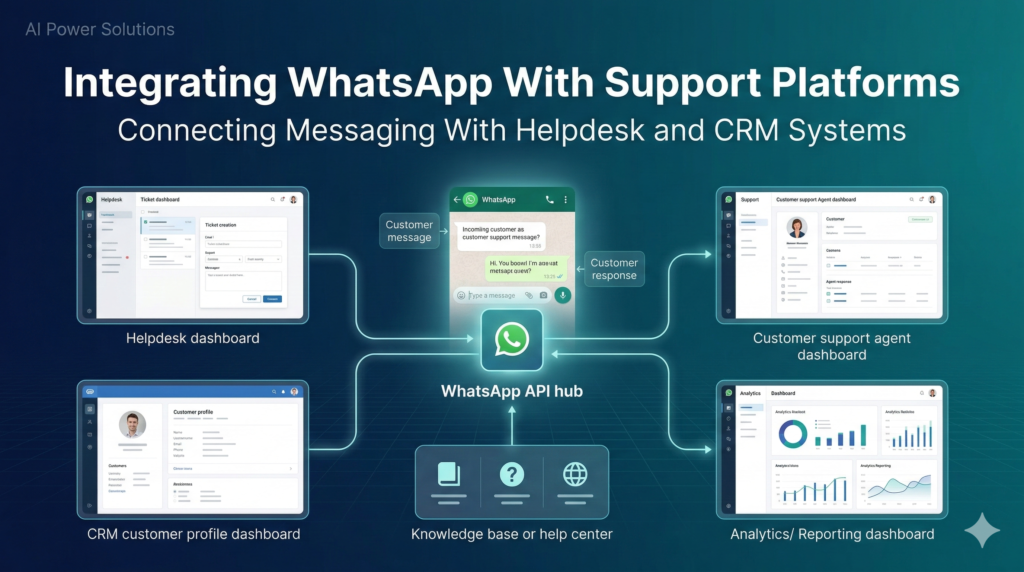
The real value of WhatsApp support automation appears when it integrates with existing support tools.
Zendesk Integration
WhatsApp messages can create or update Zendesk tickets.
Agents respond from Zendesk while customers receive replies through WhatsApp.
Freshdesk Integration
Freshdesk workflows can automatically categorize and route WhatsApp conversations.
Reports combine metrics from multiple channels.
Intercom Integration
WhatsApp conversations appear alongside web chat and email inside Intercom’s unified inbox.
Custom Support Systems
Businesses with custom platforms can use middleware services that connect WhatsApp API webhooks to internal systems.
This ensures WhatsApp becomes part of the existing support infrastructure.
7. AI Chatbots in WhatsApp Support Automation
AI is increasingly used to improve support automation.
Intent Detection
AI models understand natural language messages and categorize issues.
Automated Triage
Bots gather essential details such as:
- Order numbers
- Email addresses
- Screenshots
Agents receive cases with context already prepared.
Basic Issue Resolution
AI can provide step-by-step troubleshooting guidance or knowledge base links.
Human Escalation
Good systems ensure customers can easily reach a human agent when needed.
Providing conversation history and summaries helps agents resolve issues faster.
8. Message Templates and the 24-Hour Rule
WhatsApp business messaging follows specific rules.
24-Hour Customer Service Window
Once a customer sends a message, businesses have a 24-hour window to respond freely.
Most support conversations occur within this window.
Template Messages
If the conversation continues after 24 hours, businesses must use pre-approved templates.
Templates are often used for:
- Ticket updates
- Delivery notifications
- Appointment confirmations
- Customer surveys
Designing automation around these rules ensures compliance.
9. Measuring Support Performance
To evaluate WhatsApp support automation, businesses track several metrics.
First Response Time
Time between the first customer message and the initial response.
Automation can reduce this to seconds.
Resolution Time
Total time required to resolve an issue.
Automation speeds up simple cases and improves routing.
Ticket Deflection
Percentage of issues resolved through automation without agent involvement.
Customer Satisfaction (CSAT)
Feedback collected after support interactions.
Support Efficiency
Automation can reduce cost per case and improve agent productivity.
10. Common Mistakes in WhatsApp Support Automation
Several mistakes can reduce the effectiveness of automation systems.
Overusing Bots
Automation should support human agents, not replace them entirely.
Poor Escalation Paths
Customers should always have a clear option to reach a human agent.
Lack of CRM Integration
Disconnected systems create fragmented customer data.
Ignoring Messaging Rules
Failure to follow the 24-hour rule or template policies can lead to restrictions.
Slow Agent Response
Automation improves speed but cannot compensate for poorly managed support teams.
11. The Future of WhatsApp-Based Customer Support
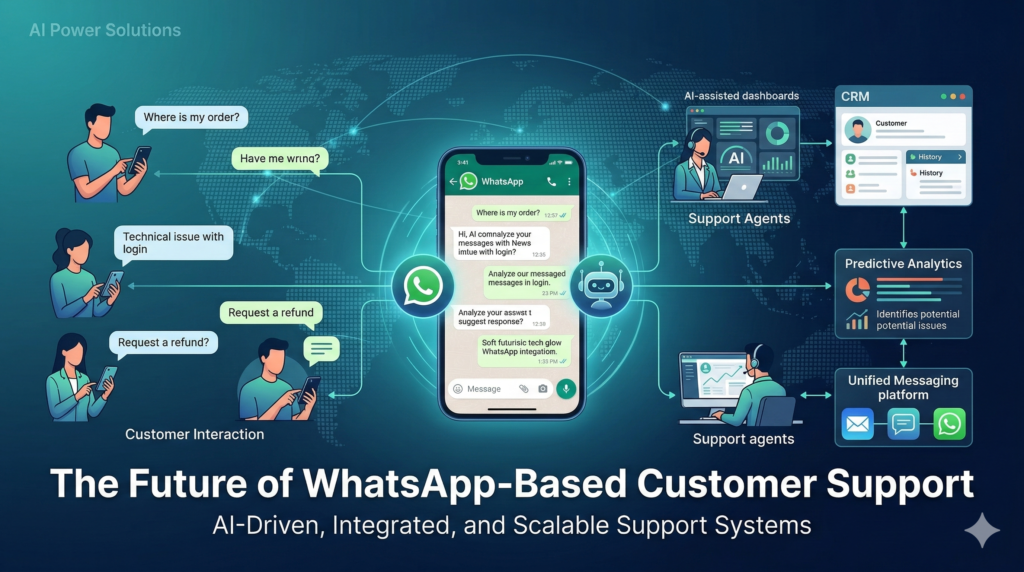
Several trends are shaping the future of WhatsApp support automation.
AI-Assisted Support Agents
AI will help agents summarize conversations and recommend responses.
Predictive Support
Systems will identify issues before customers report them.
Conversational Commerce
Support interactions may include contextual product recommendations.
Unified Messaging Platforms
Businesses will manage WhatsApp alongside email, web chat, and other channels within a single platform.
Conclusion
WhatsApp API customer support automation is transforming how modern businesses manage support operations.
By combining automation, CRM integration, and well-designed workflows, companies can provide faster and more reliable service at scale.
Key elements include:
- Using the official WhatsApp Business API
- Building workflows for FAQs, tracking, and ticket management
- Integrating messaging with helpdesk systems
- Balancing automation with human support
Organizations like AIPowerSolutions.in help businesses implement WhatsApp API automation and integration systems so messaging becomes a structured, scalable part of their global customer experience.