WhatsApp Click-to-Chat Ads Automation is reshaping how businesses turn ad spend into real conversations and measurable conversions. Instead of sending users to static landing pages and hoping they fill a form, brands can now send them straight into a WhatsApp chat and let automation handle the first interaction.
For growth-focused teams, this shift is not just about another ad format. It is about building structured WhatsApp conversation funnels that capture intent, qualify leads, and route them into sales and CRM systems with minimal manual effort.
1. The Shift to Conversational Marketing
Over the last few years, customers have become more comfortable talking to brands the same way they talk to friends: through messaging apps. WhatsApp, Messenger, and other channels have become default spaces for quick questions, support, and purchase decisions.
Traditional funnels look like this:
- Ad click → Landing page → Form → Thank‑you page → Delayed follow‑up
Conversational funnels are simpler:
- Ad click → WhatsApp chat → Instant interaction
Click‑to‑WhatsApp ads make this second path possible. When you connect these ads to WhatsApp API automation, every ad click can trigger a structured workflow instead of an unstructured chat. That is where serious lead generation and qualification at scale becomes realistic.
2. What Are WhatsApp Click-to-Chat Ads?
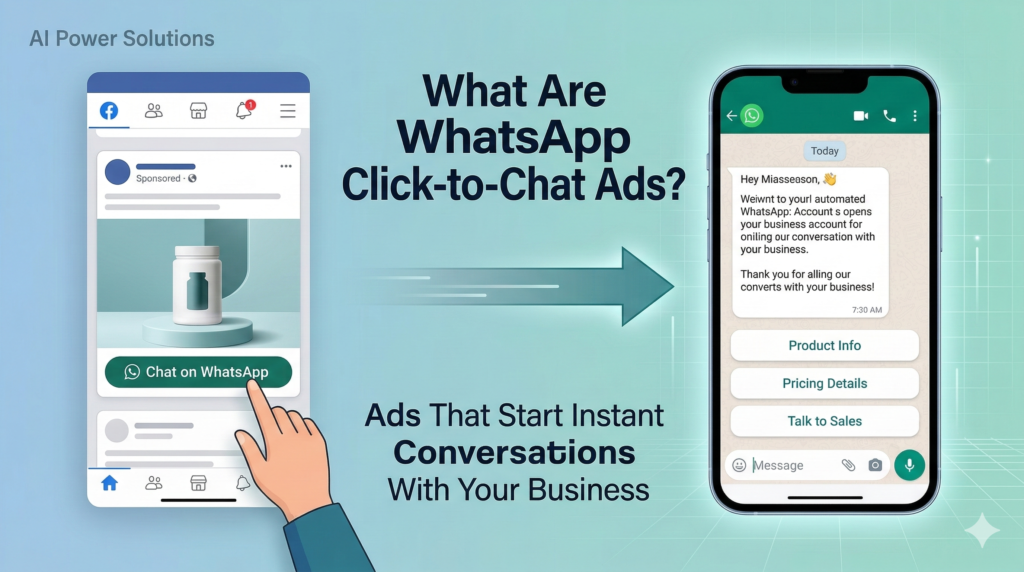
WhatsApp Click‑to‑Chat ads (often called Click‑to‑WhatsApp or CTWA) are Meta ad formats that open a WhatsApp conversation when a user taps the ad.
They typically:
- Run on Facebook and Instagram in placements like feed, stories, and Marketplace.
- Show a CTA such as “Chat on WhatsApp” or “Send Message”.
- Open a WhatsApp thread with the business instead of loading a website or lead form.
You can also define a pre‑filled message so that when the chat opens, the user sees a starter text like “Hi, I’m interested in your product” and can send it instantly.
The core difference from traditional lead forms is that the interaction starts as a conversation, not a form submission. That conversation can then be handled by live agents, a bot, or a combination of both.
3. Why Click-to-WhatsApp Ads Convert Better
Many brands are seeing stronger performance from Click‑to‑WhatsApp ads compared to classic “click to website” campaigns. Several factors drive this:
Reduced Friction
- No slow‑loading landing pages.
- No long forms to fill.
- One tap opens WhatsApp, which users already know and trust.
Less friction usually means more people move from ad click to actual engagement.
Real-Time Conversations
Instead of waiting for email replies or call‑back forms, users can:
- Ask clarifying questions immediately.
- Share screenshots or photos.
- Get quick guidance before deciding.
This real‑time element is crucial in categories like services, education, real estate, travel, and high‑consideration ecommerce.
Higher Engagement vs Landing Pages
Users are more likely to read and reply to a WhatsApp message than to a generic landing page. WhatsApp supports:
- Rich media (images, videos, documents).
- Buttons and list messages.
- Quick replies that guide the next step.
The format naturally encourages interaction instead of passive browsing.
Trust in WhatsApp as a Channel
WhatsApp is familiar, encrypted end‑to‑end for users, and seen as a personal space. A direct chat often feels safer and more transparent than a random site form. When brands maintain a consistent, helpful experience there, customers are more willing to engage again over time.
4. Why Automation Is Critical for Click-to-WhatsApp Campaigns
Click‑to‑WhatsApp campaigns start simple. You run a few ads, receive a manageable number of chats, and your team answers manually. The challenge begins when campaigns start performing and budgets increase.
As spend scales:
- The number of incoming chats can jump from tens per day to hundreds or thousands.
- Different time zones make it hard to respond quickly everywhere.
- Agents spend time asking the same discovery questions again and again.
Without automation, you quickly see:
- Slow response times.
- Missed messages and lost opportunities.
- Unstructured chat histories that never reach the CRM.
WhatsApp API automation solves this by:
- Automatically greeting new contacts.
- Asking consistent qualification questions.
- Capturing key data and creating CRM records.
- Routing high‑value leads to agents in real time.
In other words, automation lets you treat Click‑to‑WhatsApp ads as a scalable acquisition channel, not a one‑off experiment.
5. How Click-to-WhatsApp Ads Connect With the Official API
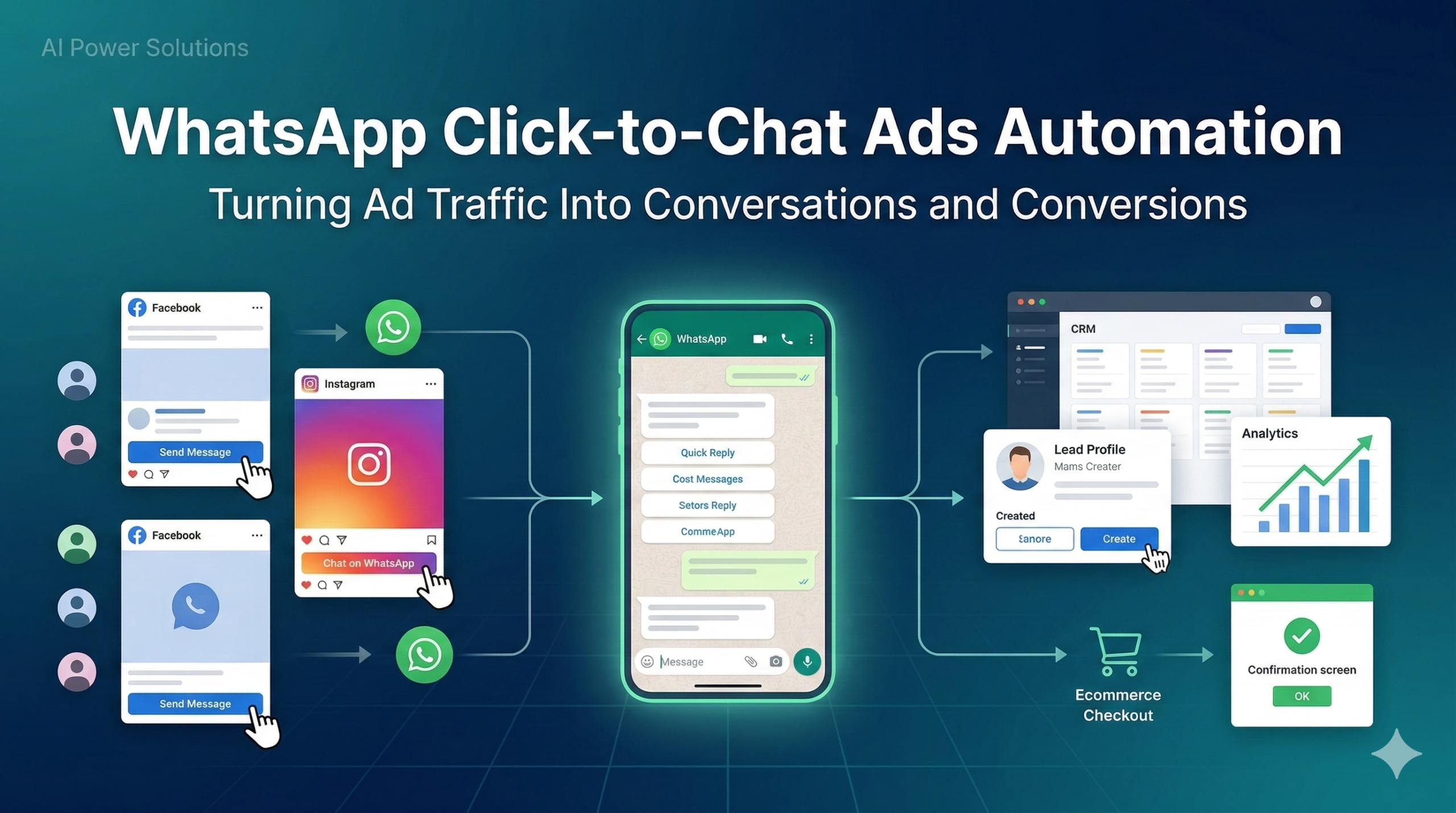
To understand WhatsApp Click‑to‑Chat Ads Automation, it is useful to see the system architecture end‑to‑end.
Step 1: Ad Click → WhatsApp Entry
- User taps the ad on Facebook or Instagram.
- Meta opens a chat with your WhatsApp business number.
- Optionally, a pre‑filled message appears to prompt the user to start.
Step 2: Message Received via WhatsApp API Webhook
If your number is connected to the Official WhatsApp Business API:
- The incoming message (or conversation start event) is delivered to your backend via a webhook.
- Payload includes sender details, message content, timestamp, and conversation metadata.
Step 3: Automation Engine Triggers a Workflow
Your automation system—either custom built or via a platform like AIPowerSolutions.in—evaluates this event and:
- Identifies that it came from an ad campaign (e.g., via tracking parameters or context).
- Chooses the correct flow (for example, “Lead from Campaign X”).
Step 4: CRM Record Creation
The system then:
- Creates or updates a contact in the CRM (HubSpot, Zoho, Salesforce, or a custom system).
- Stores key attributes such as source campaign, country, language, and answers from the conversation.
Step 5: Qualification Automation
The bot or guided flow asks short, targeted questions to understand:
- What the user is looking for.
- Their budget range or readiness to buy.
- Company size or role (for B2B).
- Timeframe or urgency.
User responses update the CRM in real time.
Step 6: Agent Handoff
Once the system has enough information, it decides:
- Whether to connect the user to a human agent immediately (for high‑intent leads).
- Or move them into a nurturing flow (for earlier‑stage leads).
The result is that WhatsApp becomes a structured lead pipeline rather than a chaotic inbox.
6. Core Automation Workflows for Click-to-WhatsApp Ads
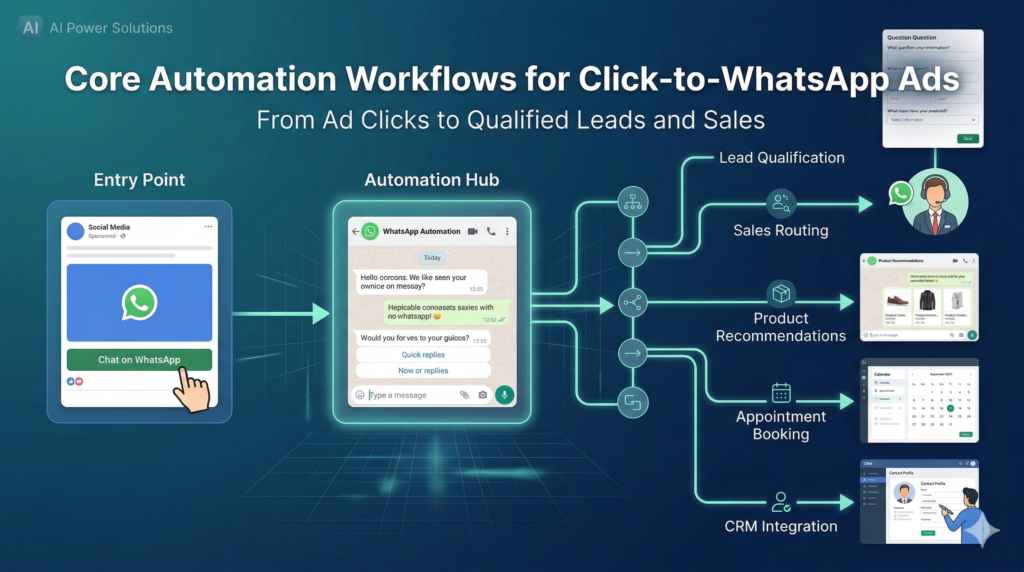
With the Official API in place, you can design specific workflows for Click‑to‑WhatsApp traffic. Here are core patterns that work across industries:
Lead Qualification Flow
Goal: Capture intent quickly without overwhelming the user.
Flow example:
- Greet the user with a short, friendly message and set expectations.
- Ask one question at a time (for example, “What are you interested in?” with 2–4 quick reply options).
- Collect essentials: use case, budget range, location, or timeline.
- Write all answers into the CRM contact record.
This creates a consistent dataset that sales can filter, sort, and prioritize.
Instant Sales Routing
Goal: Get high‑value or high‑intent leads to a human fast.
Flow example:
- If responses match high‑intent criteria (for example, “ready to buy this month”, “budget above X”, “company size above Y”), the automation:
- Assigns the conversation to a sales agent or queue.
- Notifies the agent in their inbox or internal tool.
- Optionally sends a holding message to the user like “Connecting you to a specialist now.”
This ensures that the best leads are never left waiting.
Automated Product Recommendations
Goal: Help users decide faster with guided options.
Flow example:
- Bot asks a few preference or requirement questions.
- Based on the answers, it sends:
- 2–3 recommended products or plans.
- Short descriptions, images, and key differences.
- Buttons for “Learn more”, “See price range”, or “Talk to an expert”.
This approach is especially effective for ecommerce, education programs, and subscription services.
Appointment Booking
Goal: Move from interest to a scheduled conversation or demo.
Flow example:
- Once a lead is qualified, the automation:
- Offers available time slots.
- Connects to a scheduling tool or calendar.
- Confirms the appointment in WhatsApp with date, time, and meeting link or location.
Reminders and follow‑ups can then be managed via WhatsApp templates inside or outside the 24‑hour window, depending on timing.
Lead Nurturing for Not-Ready Leads
Not every contact from a Click‑to‑WhatsApp ad will be ready to buy immediately. For those:
- Capture their preferences and objections.
- Tag them in the CRM as “researching”, “early‑stage”, or similar.
- Enroll them into a nurturing journey that:
- Shares relevant content.
- Checks in after a few days or weeks using templates.
- Invites them to book a call when they are ready.
This turns initial curiosity into a managed pipeline rather than a one‑time chat.
7. Integrating WhatsApp Ad Leads With CRM
For WhatsApp Click‑to‑Chat Ads Automation to work as a real system, WhatsApp must talk to your CRM.
Common CRM setups include:
- HubSpot: Contacts created via webhook events; properties updated based on chat responses; workflows triggered by lifecycle stage.
- Zoho CRM: Leads created, assigned, and moved across pipelines as they interact in WhatsApp.
- Salesforce: WhatsApp conversations logged as activities; fields updated; opportunities linked to contacts.
- Custom CRMs or data platforms: Webhook handlers write directly into custom tables or APIs.
Once this integration is in place, you can:
- Use lead scoring to prioritize WhatsApp leads based on fit and engagement.
- Track lifecycle from first ad click to closed deal.
- Measure how Click‑to‑WhatsApp leads perform versus other lead sources.
AIPowerSolutions.in focuses on this systems layer: connecting WhatsApp API events with CRM objects, fields, and pipelines so your teams can work from a single source of truth.
8. Message Templates and the 24-Hour Rule
Click‑to‑WhatsApp ads trigger user‑initiated conversations, but compliance still matters. Two rules are particularly important:
24-Hour Customer Service Window
- When a user sends a message, a 24‑hour window opens.
- Inside that window, you can reply with free‑form messages (service messages).
- After 24 hours, you cannot send arbitrary replies.
Template-Based Follow-Ups
To continue after the 24‑hour window:
- You must use pre‑approved message templates.
- Templates can be categorized as marketing, utility, or authentication depending on content and purpose.
- Each template has fixed text with dynamic variables for personalization.
For Click‑to‑WhatsApp campaigns, this means:
- Initial flow and first follow‑ups usually happen inside the 24‑hour window.
- Longer‑term nurturing or re‑engagement uses templates to stay compliant.
Designing your Click‑to‑WhatsApp automation with these rules in mind ensures you can scale without policy issues.
9. Measuring ROI From WhatsApp Ad Automation
To run WhatsApp Click‑to‑Chat Ads Automation as an ongoing system, you need clear metrics. Useful metrics include:
- Response time: How quickly users receive the first reply after clicking the ad. Automation can bring this down to seconds.
- Conversation start rate: Percentage of ad clicks that result in a message being sent.
- Conversation-to-lead conversion: How many conversations become qualified leads in your CRM.
- Lead qualification rate: Share of leads that meet your ideal criteria.
- Sales conversion rate: How many qualified WhatsApp leads become customers.
- Customer acquisition cost by channel: Comparing Click‑to‑WhatsApp campaigns with other acquisition methods.
When WhatsApp, CRM, and analytics are connected, you can trace the whole path: ad impression → click → conversation → qualification → deal.
10. Common Mistakes Businesses Make
Even strong marketing teams fall into predictable traps when they first adopt Click‑to‑WhatsApp ads:
- Sending traffic to WhatsApp without any automation, leaving one person to manage all chats manually.
- Skipping qualification flows and relying on agents to ask basic questions repeatedly.
- Responding slowly, especially during peak hours or across time zones.
- Not integrating with CRM, so conversations never turn into structured data.
- Using unofficial WhatsApp tools that later break or trigger bans.
These issues usually come from treating Click‑to‑WhatsApp ads as a campaign feature instead of part of a larger conversational system.
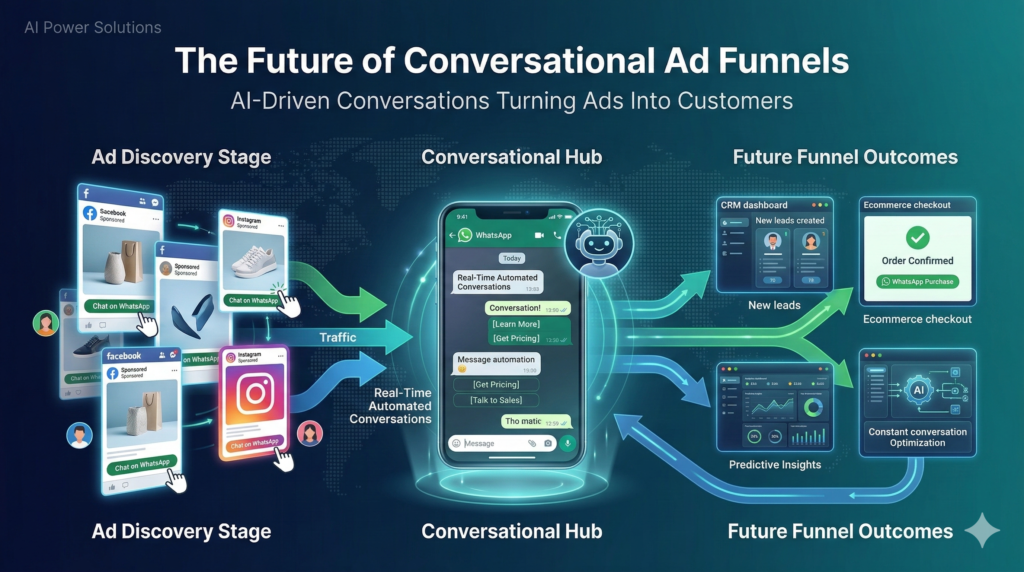
11. The Future of Conversational Ad Funnels
Several trends suggest that WhatsApp Click‑to‑Chat Ads Automation will become even more central in digital acquisition:
- AI-assisted qualification: Bots that understand open‑ended questions, summarize conversations, and suggest next actions to agents.
- WhatsApp‑first funnels: Especially in markets where WhatsApp is dominant, some brands may use WhatsApp as the primary entry point instead of websites.
- Conversational commerce: Product browsing, recommendations, and even payments happening inside WhatsApp.
- Tighter marketing integration: Deeper connections between WhatsApp events, ad platforms, and marketing automation tools, enabling smarter retargeting and lookalike audiences.
To benefit from these shifts, businesses need strong foundations now: Official API access, clean integrations, clear workflows, and governance.
12. Conclusion
WhatsApp Click‑to‑Chat ads are a powerful way to turn ad traffic into real‑time conversations. But on their own, they are only half the story.
To turn those conversations into consistent conversions at scale, you need WhatsApp Click‑to‑Chat Ads Automation built on the Official WhatsApp Business API, integrated with your CRM, and designed around clear workflows for qualification, routing, and follow‑up.
AIPowerSolutions.in helps businesses, agencies, and SaaS teams design and implement these WhatsApp API‑powered lead automation systems—so Click‑to‑WhatsApp ads become reliable conversational funnels, not just another campaign format.